
Description
The gravityflow_toolbar_menu_items filter allows developers to modify the toolbar menu items in the Gravity Flow interface. This filter is applied in the get_toolbar_menu_items() method and enables customization of the toolbar navigation that appears in the Gravity Flow admin area.
Usage
add_filter( 'gravityflow_toolbar_menu_items', 'your_callback_function', 10, 1 );
Parameters
| Parameter | Type | Description |
|---|---|---|
| $menu_items | Array | An associative array of toolbar menu items, where each item contains configuration for display, styling, and functionality. |
Menu Item Structure
Each menu item in the array should have the following structure.
array(
    'label'        => 'Display Label',
    'icon'         => '<i class="fa fa-icon-name fa-lg"></i>',
    'title'        => 'Tooltip text',
    'url'          => '?page=gravityflow-page-name',
    'menu_class'   => 'css-class-name',
    'link_class'   => 'active-or-inactive-class',
    'capabilities' => 'required_capability',
    'priority'     => 1000,
)
Examples
Add a Custom Toolbar Menu Item.
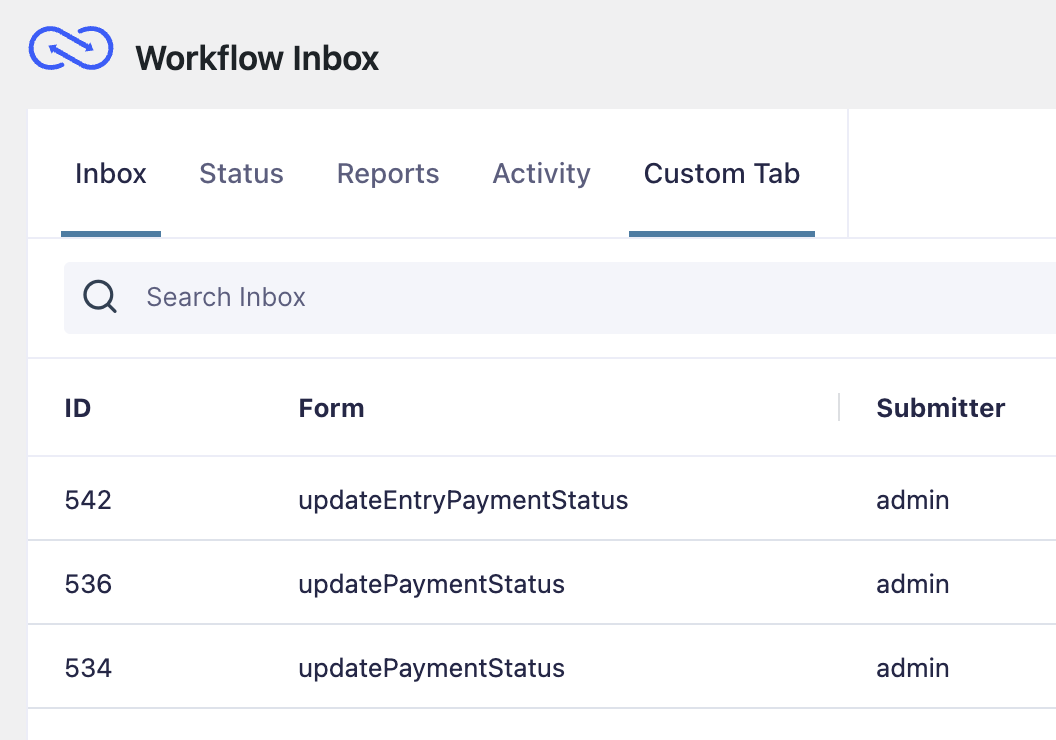
We are add a Custom Tab item which shows the Inbox page. You can create custom pages too.
add_filter( 'gravityflow_toolbar_menu_items', 'gfw_custom_gravityflow_toolbar_item' );

function gfw_custom_gravityflow_toolbar_item( $menu_items ) {
    $custom_item = array(
        'label'        => esc_html__( 'Custom Tab', 'text-domain' ),
        'icon'         => '<i class="fa fa-cog fa-lg"></i>',
        'title'        => __( 'Custom tab for workflow management', 'text-domain' ),
        'url'          => '?page=gravityflow-inbox',
        'menu_class'   => 'gf_form_toolbar_settings',
        'link_class'   => ( rgget( 'page' ) == 'gravityflow-inbox' ) ? 'gf_toolbar_active' : '',
        'capabilities' => 'gravityflow_inbox',
        'priority'     => 500,
    );
    $menu_items['custom_tool'] = $custom_item;
    return $menu_items;
}
Placement
This code can be used in the functions.php file of the active theme, a custom functions plugin, a custom add-on, or with a code snippets plugin.
See also the PHP section in this article: Where Do I Put This Code?
Source Code
This filter is located in class-gravity-flow.php