Introduction
The Stripe Extension includes an additional field type, which you’ll find in the Workflow section of the Gravity Forms Form Editor.
What is the Transaction ID Field?
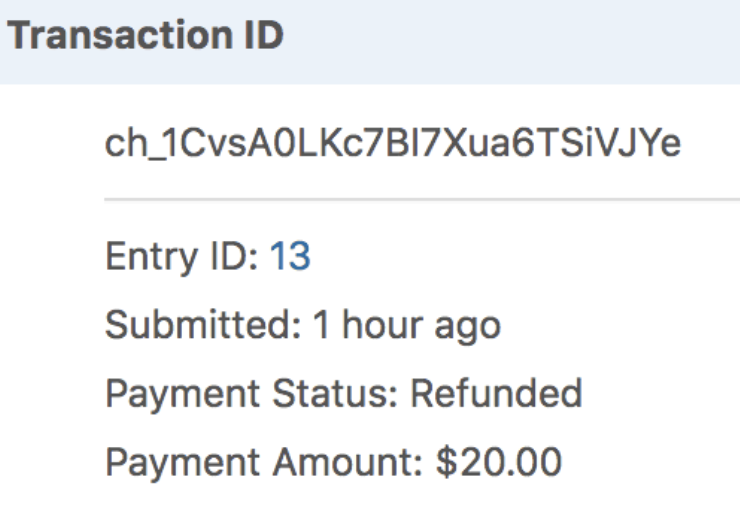
The Transaction ID field validates an existing Stripe transaction ID (format: pi_xxxxxxxxxxxx) when a user submits a form or completes a step with editable fields (User Input / Approval). Once validated, it displays basic transaction details on the entry detail page, workflow entry detail page, and in merge tags.
Note: This field validates existing transactions. It does not store the transaction ID from the current form submission processing a Stripe payment feed.
Limitations
- The transaction ID must be from a Stripe payment processed on the same WordPress site.
- Transaction IDs from staging/production environments, external Stripe accounts, or Stripe payments processed outside of Gravity Forms will not validate.
How Customers Can Find Their Transaction ID
In order for your customers to successfully submit a transaction ID, a previous form involved a Stripe payment processing could have provided it to them automatically using the {entry:transaction_id} merge tag in a confirmation, notification or other method after payment processing.
To locate a transaction ID in your Stripe Dashboard, navigate to Payments, then click the specific payment to view its details. The transaction ID appears at the top of the payment details page. Refer to the Stripe official documentation for more information.
Using the Merge Tag
By default, the field merge tag outputs transaction details similar to the entry detail page shown above. If you need to output just the Transaction ID without the payment details, use the “value” modifier: {Transaction ID:1:value}
Connecting Entry IDs to Transaction IDs
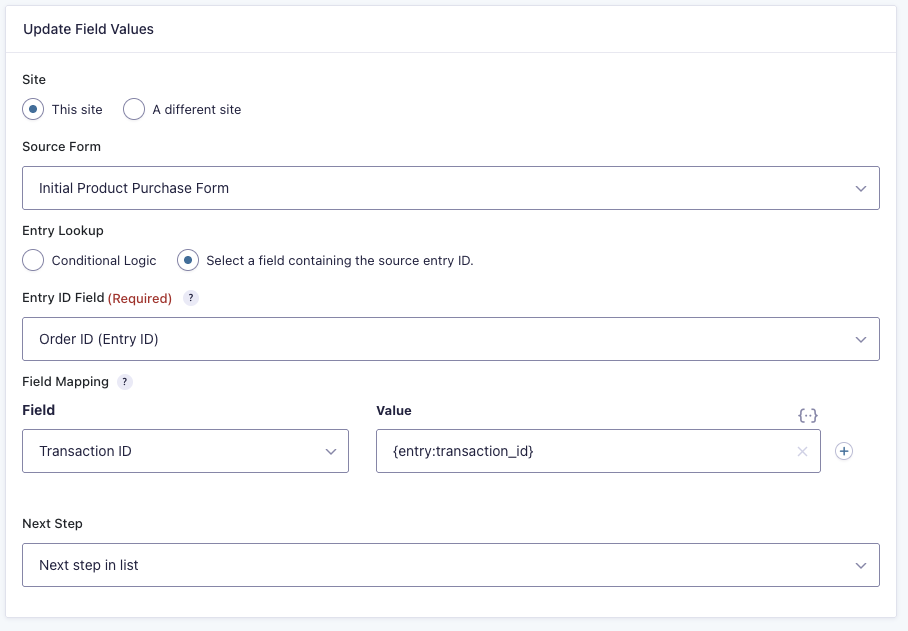
If you need to reference a transaction from a previous form submission (where the customer only knows their entry ID, not the Stripe transaction ID), you can use the Form Connector Extension with an Update Fields step. After defining the Entry Lookup criteria to identify the previous entry, you would use the {entry:transaction_id} merge tag in the Field Mapping value column to store its’ transaction ID into the transaction ID field of the current entry.