
Description
This endpoint allows external services to submit data directly into a form to create a new entry. Settings defined in the Incoming Webhook Create an Entry feed will determine what the request body (JSON key/value pairs) will be needed to populate entry field values.
Note: If you want to update an existing entry during it’s workflow, refer to the Incoming Webhook Workflow Step Type and related Rest API V2 documentation.
Authentication
This endpoint uses a secure key defined as a part of the Incoming Webhook feed configuration to authenticate requests against. The feed ID and key in the URL path serve as the authentication mechanism. No additional capabilities are required.
If this is not secure enough for your use case then you should consider adding some custom code via the gravityflowincomingwebhook_check_permissions filter to verify the authenticity of the request at a more granular level.
Using the Endpoint
Path and Method
POST /wp-json/gf/v2/workflow/webhooks/[feed_id]/[key]
The path must include both the specific feed ID for the webhook configuration and the authentication key that was configured in the feed.
Required Properties
The request body should contain the data to be mapped to form fields as configured in the webhook settings. The specific properties depend on the field mappings configured for the webhook. Data can be sent as either:
- JSON: Content-Type: application/json
- Form Data: Content-Type: application/x-www-form-urlencoded
- Multipart Form Data: Content-Type: multipart/form-data (supports file uploads)
See the Usage section for examples of form fields, feed settings and how it relates to the request body.
Response
Success
A successful response will contain a JSON object confirming the entry creation operation was completed.
| Key | Type | Description |
|---|---|---|
| result | string | Indicates the operation result. For a successful entry creation the value will be created |
Failure
A failed response will provide a JSON string of the error code and message.
| Key | Type | Description |
|---|---|---|
| code | string | Error code. |
| message | string | Human-readable error message. |
| data[status] | integer | HTTP response status code |
There are several failure scenarios which could be returned depending on request data provided.
| Response Code and data[status] | Error Code | Message |
|---|---|---|
| 401/403 | rest_forbidden | User does not have the required permissions for this endpoint. |
| 404 | form_not_found | Form not found. |
| 422 | not_created | Entry was not created because no values were mapped to fields. |
Usage
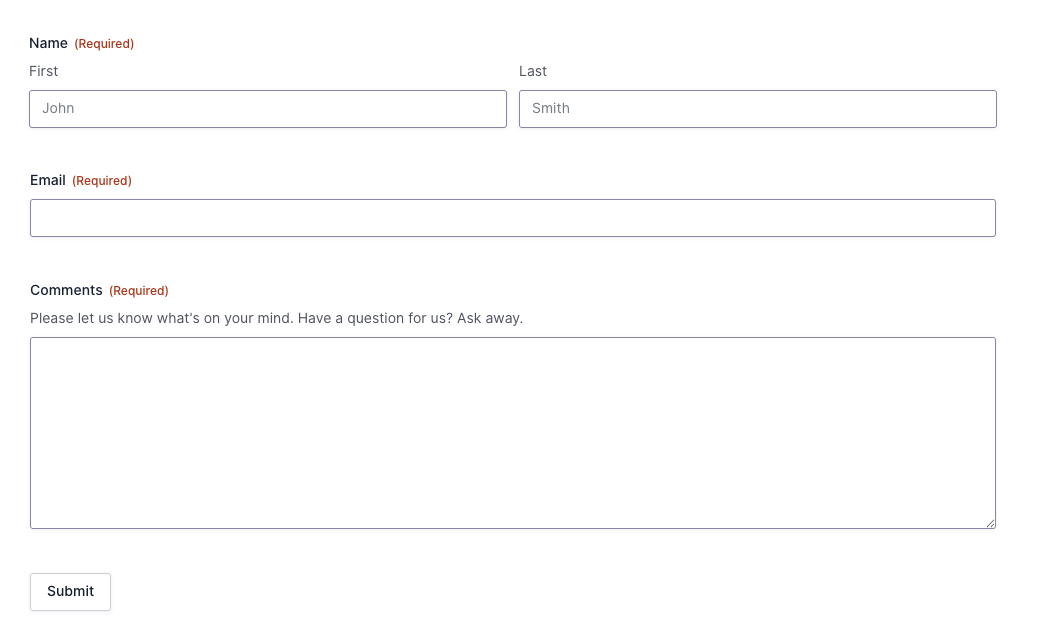
For the examples below, we will use a basic contact form setup with the following fields:
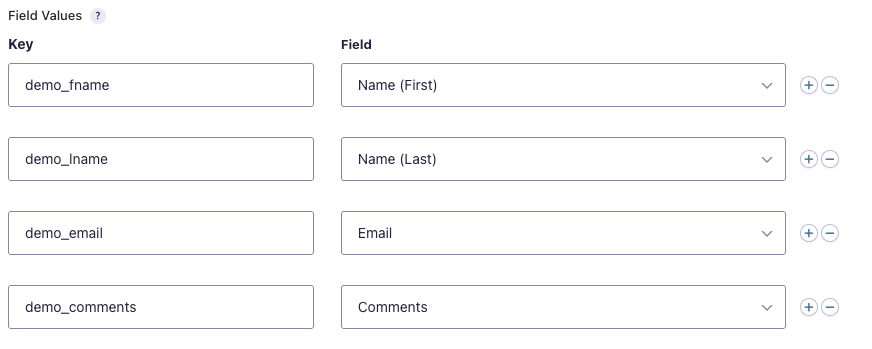
When setting up the Incoming Webhook feed you can chose which fields will be mapped based on which keys. Not all fields require mapping.
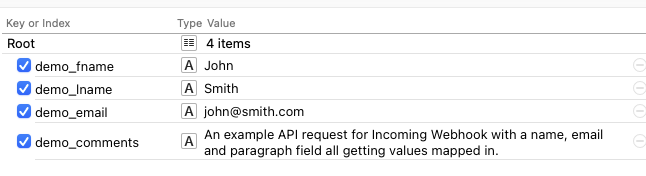
If you were using a testing tool like Postman or RapidAPI, your request body definition would look like the following:
Example Response
{"result":"created"}
cURL Request
curl -X "POST" "https://example.com/wp-json/gf/v2/workflow/webhooks/1234/abc1de2fg3HIJk4L5Mn6o7P8q9RstU" \
     -H 'Content-Type: application/json; charset=utf-8' \
     -d $'{
  "demo_lname": "Smith",
  "demo_email": "[email protected]",
  "demo_comments": "An example API request for Incoming Webhook with a name, email and paragraph field all getting values mapped in.",
  "demo_fname": "John"
}'
PHP Request
<?php

//Replace these variables with values relevant to your site.
$website_url    = 'https://example.com';
$endpoint       = '/wp-json/gf/v2/workflow/webhooks/1234/abc1de2fg3HIJk4L5Mn6o7P8q9RstU';

$json_array = [
  'demo_lname' => 'Smith',
  'demo_email' => '[email protected]',
  'demo_comments' => 'An example API request for Incoming Webhook with a name, email and paragraph field all getting values mapped in.',
  'demo_fname' => 'John'
];

// get cURL resource
$ch = curl_init();

curl_setopt($ch, CURLOPT_URL, $website_url . $endpoint );
curl_setopt($ch, CURLOPT_CUSTOMREQUEST, 'POST');
curl_setopt($ch, CURLOPT_RETURNTRANSFER, 1);
curl_setopt($ch, CURLOPT_HTTPHEADER, [
  'Content-Type: application/json; charset=utf-8',
]);

$body = json_encode($json_array);

// set body
curl_setopt($ch, CURLOPT_POST, 1);
curl_setopt($ch, CURLOPT_POSTFIELDS, $body);

// send the request and save response to $response
$response = curl_exec($ch);

// stop if fails
if (!$response) {
  die('Error: "' . curl_error($ch) . '" - Code: ' . curl_errno($ch));
}

echo 'HTTP Status Code: ' . curl_getinfo($ch, CURLINFO_HTTP_CODE) . PHP_EOL;
echo 'Response Body: ' . $response . PHP_EOL;

// close curl resource to free up system resources
curl_close($ch);
Since
This endpoint was added in Gravity Flow Incoming Webhook 1.3.1
Source Code
This endpoint is located in the gravityflowincomingwebhook/includes/class-step-incoming-webhook.php file.